

A customer places an order on Monday evening. The shipping confirmation goes out and lands in a full inbox, somewhere between newsletters and the promotions tab. By Thursday, the question "Where's my package?" still shows up in the support inbox anyway. Yet the answer had long been on its way—just in a channel the customer wasn't keeping an eye on at that moment.
In e-commerce, email remains indispensable. For newsletters, receipts, and anything you read at length and at your leisure, it's exactly right. But in time-critical moments, it isn't always the most reliable route. That's precisely where SMS and WhatsApp play to their strengths. Industry-standard surveys cite SMS open rates of around 98 percent, often within just a few minutes of delivery. Email averages about 20 percent. (The SMS figure is an estimate, since unlike email there's no tracking pixel.) So the difference is considerable, and that's exactly where Notify comes in.
The full product name is "Notify: Notifications via SMS or WhatsApp (Optimize the order workflow)." The plugin for Shopware 6 sends automated notifications via SMS and WhatsApp directly from within Shopware.
What Notify Does
Notify adds two additional notification channels to Shopware 6. Important customer information therefore no longer has to go out exclusively via email. Instead, you use existing Shopware flows to trigger messages via SMS or WhatsApp.
In practice, this covers messages such as:
- Order confirmations sent straight to the smartphone right after purchase
- Shipping notifications with up-to-date information on package status
- Alerts about outstanding payments or other status changes
- Short service messages in response to inquiries
- Custom process updates defined in the Flow Builder
The actual sending runs through external services. Currently, Notify comes with ready-made channels for Twilio SMS and Twilio WhatsApp. Additional external providers will follow in the future.
Right Inside the Shopware Flow Builder
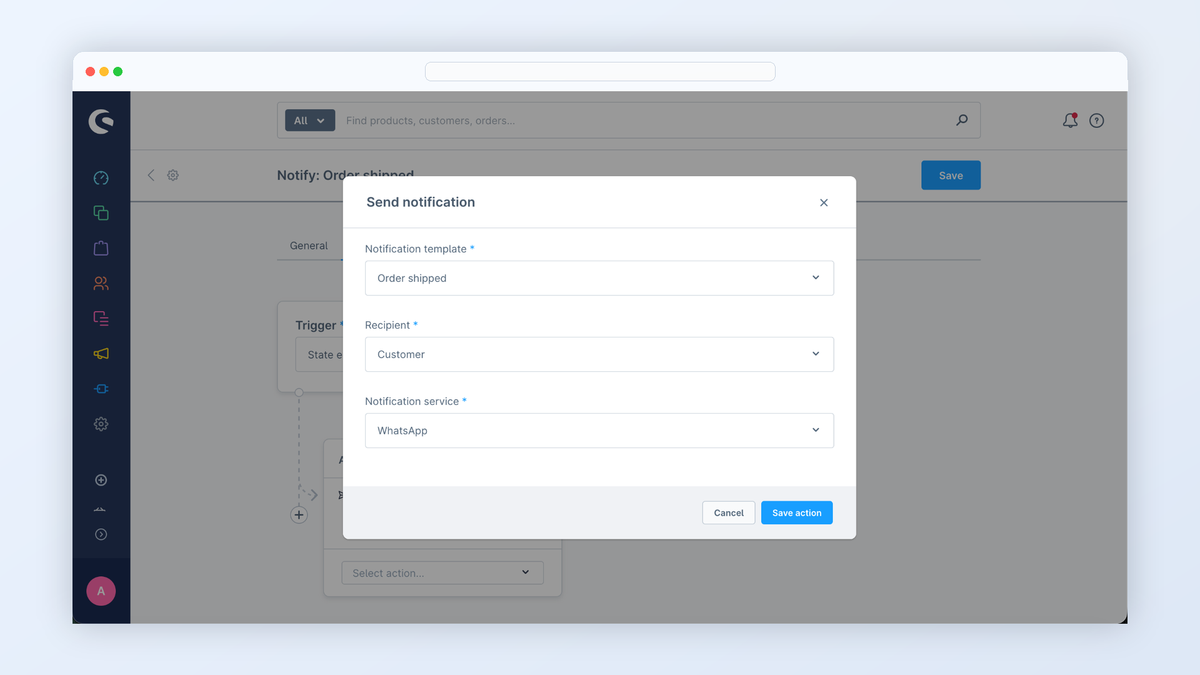
Notify integrates directly into the Shopware Flow Builder. Notifications can therefore be set up right where your other automations already live.
Using the "Send notification" flow action, you define which template is used and which channel the message goes out through. If desired, whether the customer consented to a notification during checkout is also factored in. This lets you assemble workflows flexibly, entirely without additional interfaces or external automation tools.
Templates, Variables, and Preview
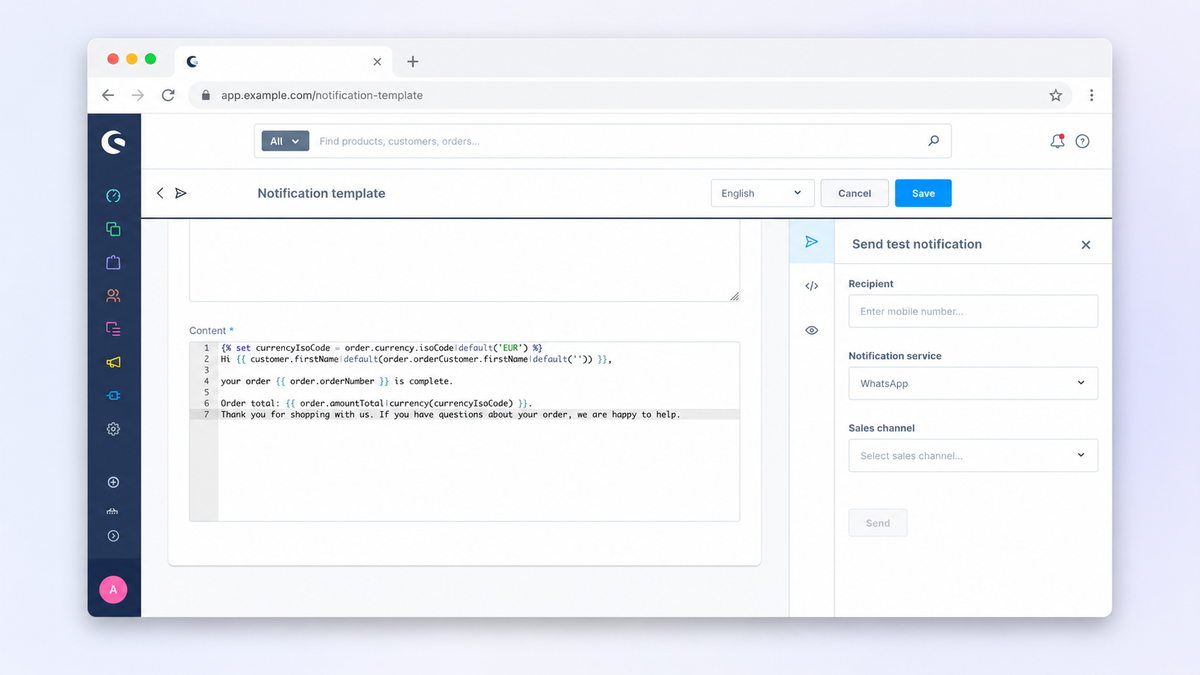
So that the text doesn't have to be rewritten for every message, Notify brings its own standalone template system directly into the Shopware administration.
There you create templates, maintain them, and test them beforehand. Through dynamic variables, content from Shopware flows automatically into the message—for example the order number, shipping info, or customer data. The reusable header and footer building blocks are also handy. They keep service texts, sender details, or STOP notices consistent across all messages.
Opt-in at Checkout
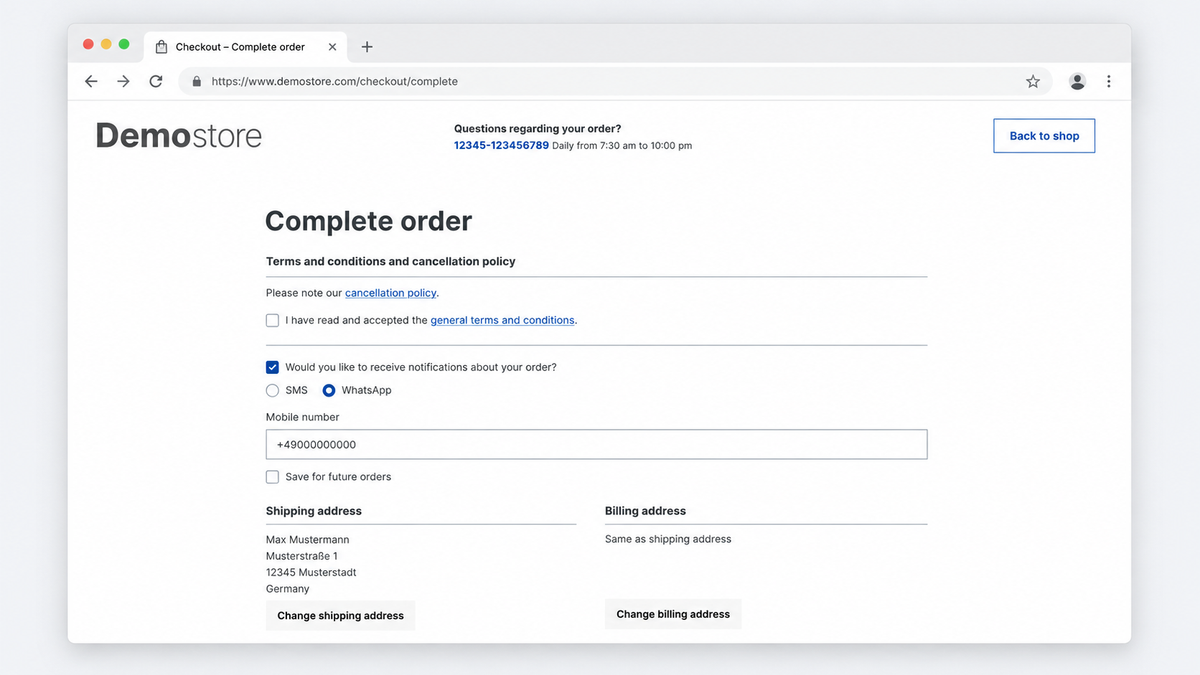
If desired, Notify displays an active consent option for SMS or WhatsApp notifications during checkout. The customer thus decides for themselves whether they want to receive updates via these channels.
This decision is stored and is then available in the Flow Builder and the Rule Builder. That way, notifications only go out to customers who actually want to receive them. Please note: the legally sound design of consents, texts, and sending processes depends on the individual case and should be reviewed individually.
Logs and STOP Processing
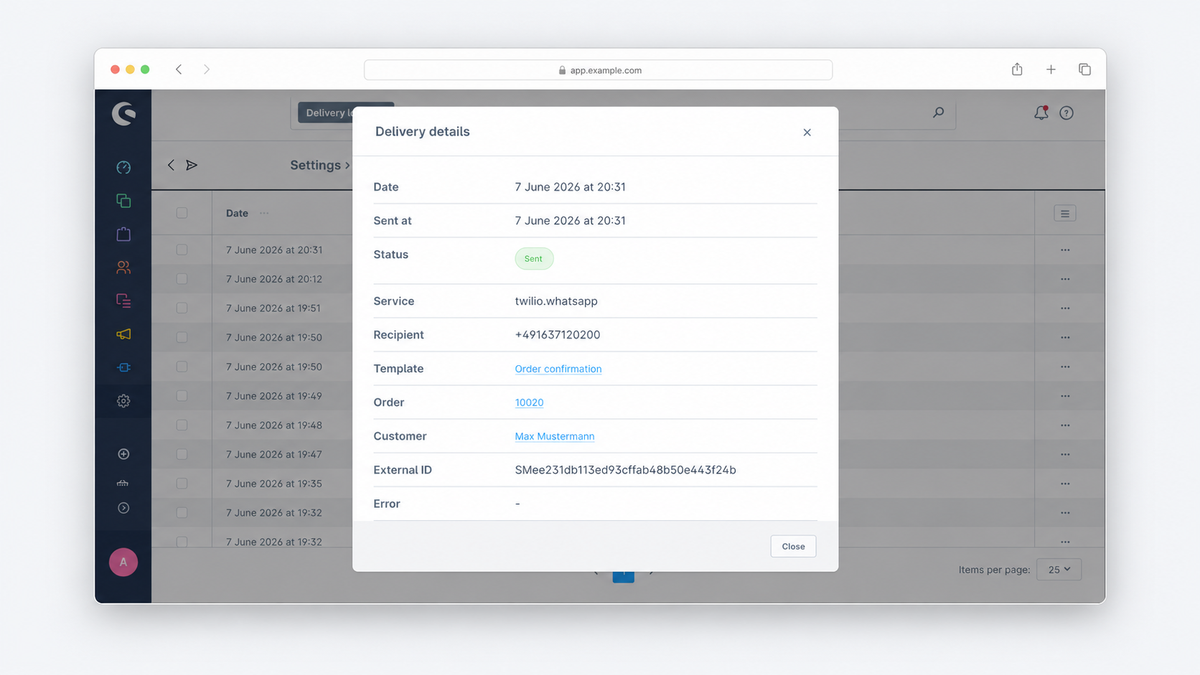
In day-to-day operations, it helps enormously to be able to trace at any time what has actually gone out. Notify therefore logs both successfully sent and failed notifications. This lets you see at a glance which messages were triggered and where there may have been problems during sending.
Incoming webhook events, such as STOP replies from recipients, can also be made visible in the administration. For Twilio, the plugin provides a matching webhook URL that is simply entered in the Twilio configuration.
Who Notify Is Suited For
Notify is especially interesting for Shopware merchants who want to set up their customer communication more directly and closer to their own processes. This applies to shops that:
- Want to deliver important order information in real time
- Want to try out SMS or WhatsApp as an additional service channel
- Want to control notifications centrally through their Shopware flows
- Want to save time with reusable templates
- Want to cleanly trace deliveries and errors within Shopware
Requirements and Costs
The actual sending requires external third-party providers (such as Twilio). These services are not part of the plugin and must be set up separately. For the included channels, the following is currently required:
- An active Twilio account with valid API credentials
- An SMS-capable sender number
- For WhatsApp, additionally an approved WhatsApp Business sender
Important for context: sending via the external third-party provider incurs ongoing costs that arise independently of the plugin. SMS are usually billed per message, WhatsApp Business messages according to their own conversation model. The exact prices depend on country, volume, and message type, and are billed directly through the external third-party provider. This is worthwhile above all where the message is truly time-critical. For plain standard information, email usually remains the cheaper choice.
Contact and Consultation
Notify is not a standard product from the Shopware Store; instead, it is provided and set up individually via a contact request. This allows you to clarify in advance whether the plugin fits your setup and use cases.
If you want to use SMS or WhatsApp notifications in your shop, feel free to get in touch. Together we'll look at your specific use case, clarify the technical requirements, and find the right implementation.
Frequently Asked Questions (FAQ)
Can I buy Notify in the Shopware Store? No. Notify is deliberately not offered as a self-service plugin in the Store, but is provided via a contact request and set up together with you.
Do I need my own Twilio account? Yes. Sending runs through Twilio. You need your own Twilio account with valid API credentials as well as an SMS-capable sender number, and for WhatsApp additionally an approved WhatsApp Business sender. We will connect additional providers such as Brevo in the future. If you're interested, feel free to reach out.
What does sending messages cost? The sending costs arise directly with Twilio or another messaging service and are not part of the plugin. SMS are usually billed per message, WhatsApp according to its own conversation model. The amount depends on country, volume, and message type.
Which Shopware version does Notify work with? Notify is designed for Shopware 6.
Can customers without consent also receive messages? No, if you use the checkout opt-in: the consent is stored and available in the Flow Builder and Rule Builder, so you can restrict sending specifically to that. The legally sound design should be reviewed on a case-by-case basis.
Can deliveries and errors be traced? Yes. Notify logs sent and failed messages and can make incoming webhook events such as STOP replies visible in the administration.